
From Legacy System to Trusted Archive: How Application Retirement Should Actually Work
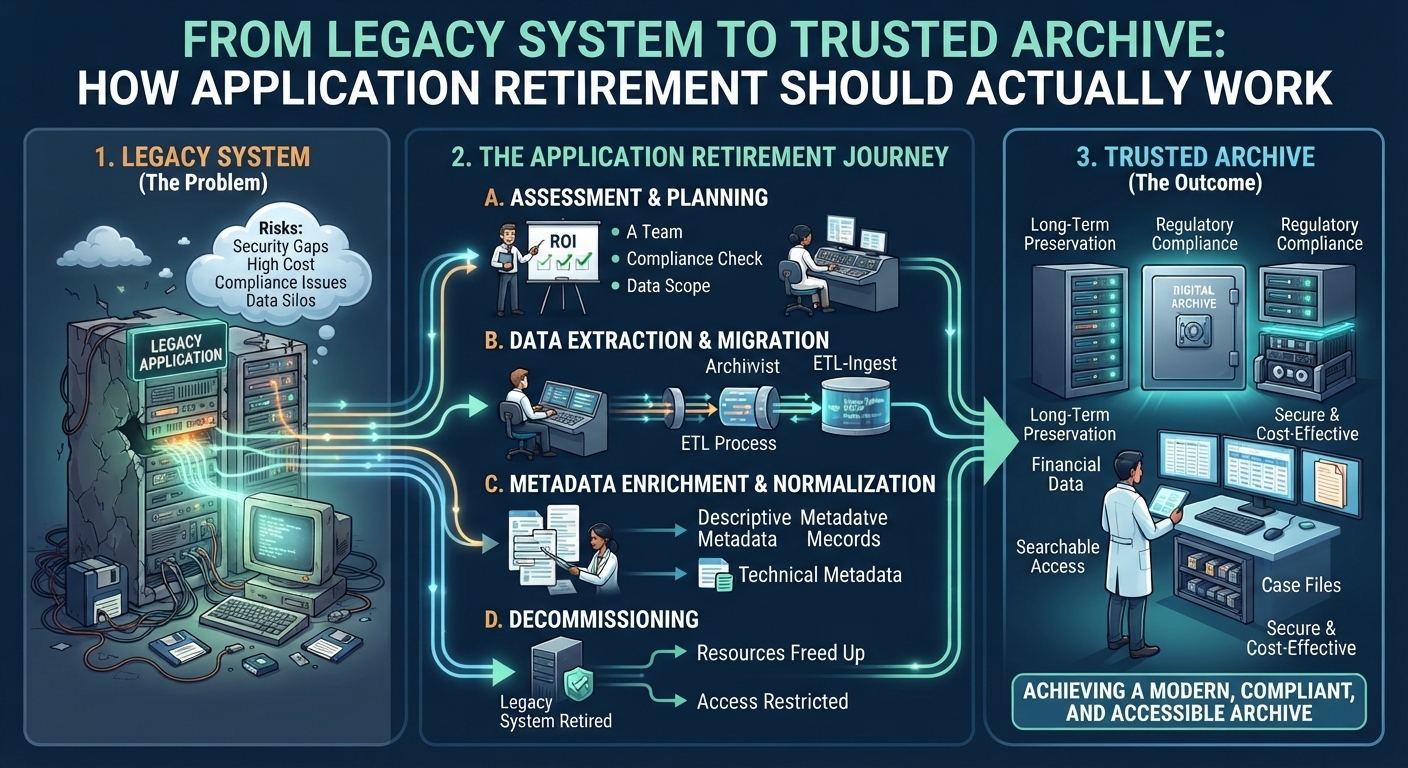
Retiring a legacy application is often treated as an IT cleanup project. A system is old, expensive, difficult to support, or no longer needed for day-to-day operations, so the organization decides to replace it and shut it down. The technical decision may be straightforward, but the information inside that system creates a much more difficult problem. Historical contracts, customer records, transactions, employee files, signed documents, audit evidence, and regulated information may still need to remain accessible long after the original application disappears.
This is why Application Retirement should not be approached as a simple data export. A successful retirement project must identify what information still has value, preserve the context that makes those records understandable, maintain retention and access controls, verify the migration, and move historical information into an environment where it can remain trustworthy without keeping obsolete software alive.
Application Retirement Starts With Information, Not Technology
One of the most common mistakes is beginning with infrastructure. Teams immediately focus on servers, licenses, databases, integrations, and shutdown dates before understanding what the application actually contains.
That order should be reversed.
Before retiring the technology, organizations need to understand the information that depends on it. The application may hold active records, historical records, duplicates, temporary data, obsolete documents, system configuration, attachments, audit information, and records subject to legal or regulatory retention.
Not all of this information needs to survive.
A proper retirement project begins by answering questions such as:
-
Which records still have business or legal value?
-
Which information is already eligible for deletion?
-
Which records are subject to retention requirements?
-
Are any records under legal hold?
-
Which metadata is necessary to understand the records later?
-
Are important relationships stored only inside the application?
-
Which documents contain digital signatures or other evidence that needs special preservation?
These decisions determine the quality of everything that follows.
Keeping the Old System Running Is Not a Preservation Strategy
Organizations often delay retirement because users occasionally need historical information. The system may no longer support active work, but shutting it down feels risky because old records remain trapped inside it.
This creates a familiar pattern. The application becomes a historical lookup tool that nobody wants but nobody feels comfortable removing.
The cost can continue for years. The organization may still need software licenses, database administration, infrastructure, backups, security monitoring, vendor support, specialist knowledge, and technical resources simply to retrieve records occasionally.
Older systems can also become harder to protect. They may depend on outdated operating systems, unsupported software components, weak authentication models, or technologies that no longer fit modern security standards.
A stronger Application Retirement strategy separates the obligation to preserve information from the obligation to preserve the software.
The records may still need to survive. The application usually does not.
The First Real Task Is Records Discovery
Before migration begins, the organization needs to understand the content of the legacy environment.
This is not simply a matter of counting files.
A system may contain documents stored directly in a database, attachments stored separately, structured transactional data, metadata, workflow history, user information, and relationships between records.
Teams need to determine which of those elements are necessary for future use.
For example, exporting a contract PDF may appear sufficient until the organization realizes that the application also stores the customer number, contract status, approval history, effective date, termination date, and retention category separately.
Without that information, the document still exists but becomes much harder to interpret.
Discovery therefore needs to focus on the business meaning of the records rather than only their technical location.
Classification Determines What Should Happen to Each Record
A legacy application can contain many different categories of information, and those categories may require different treatment.
A single system might hold:
-
customer agreements
-
financial transactions
-
employment records
-
invoices
-
regulatory documentation
-
approval histories
-
correspondence
-
identity information
-
signed documents
-
operational reports
Treating everything as one undifferentiated dataset creates problems.
Classification allows organizations to determine which records need long-term preservation, which have shorter retention requirements, which need stronger access controls, and which can be disposed of.
This prevents the common mistake of exporting everything simply because nobody has time to decide what matters.
Retiring a system should reduce information complexity, not move the same complexity into another repository.
Metadata Must Move With the Record
One of the biggest retirement failures happens when files survive but metadata does not.
Imagine retrieving a historical document five years after the source application has been shut down. The file opens correctly, but there is no clear customer identifier, transaction number, document category, approval status, or retention date.
Technically, the migration succeeded.
From an information-governance perspective, it failed.
Metadata gives a record meaning. It helps future users understand what the record represents, why it exists, and how it relates to the wider business process.
Important metadata can include:
-
original creation date
-
source application
-
customer or employee identifier
-
transaction or case number
-
record type
-
lifecycle status
-
retention category
-
business owner
-
relevant jurisdiction
-
version information
-
relationships with other records
Not every field deserves permanent preservation, but the information required to interpret and govern the record should be identified before the source system disappears.
Relationships Between Records Can Be More Important Than the Files Themselves
Many business applications are relational.
A contract may be linked to a customer. That contract may be connected to invoices, approvals, amendments, correspondence, and transactions. A case may contain dozens of related records. A historical account may depend on relationships between tables rather than one standalone document.
When migration focuses only on individual files, these connections can disappear.
Future users may be able to retrieve the documents but struggle to understand how they fit together.
A trusted archive should preserve meaningful relationships where they are necessary for interpretation.
This does not mean rebuilding the entire legacy application. The archive does not need to reproduce every workflow, button, dashboard, or screen.
It does need enough structure for future users to understand the historical record.
Retention Rules Should Continue Through the Migration
Moving a record into an archive should not reset its lifecycle.
Suppose a document must be retained for ten years and has already existed for seven. If the migration treats it as a new record, the organization could accidentally keep it for another ten years.
That creates unnecessary retention and potential privacy risk.
The opposite problem can also occur if important dates are lost and the organization cannot determine whether a record is still required.
A proper retirement process preserves relevant retention triggers, such as:
-
document creation date
-
contract termination date
-
account closure date
-
employee separation date
-
transaction completion date
-
case closure date
The archive should continue the existing lifecycle rather than inventing a new one at migration.
Legal Holds Must Be Identified Before Anything Is Deleted
Application Retirement projects often include data reduction, which is usually beneficial. But deletion becomes dangerous if records subject to litigation, investigation, audit, or other legal obligations are removed accidentally.
Legal holds can override normal retention rules.
Before records are deleted or excluded from migration, teams should determine whether any information is subject to special preservation requirements.
This is particularly important in large legacy environments where one legal matter may affect records across multiple datasets.
A controlled retirement process should be able to distinguish between records that are eligible for disposition and records that must remain preserved despite reaching the end of their normal retention period.
Digitally Signed Records Need Special Treatment
A signed document cannot always be treated like an ordinary file.
A PDF may contain a visible electronic signature, but future verification can depend on additional information such as certificates, timestamps, validation evidence, and audit history.
If retirement teams export only the visible document and leave the supporting evidence behind, long-term trust may weaken.
Years later, the organization may still possess the signed record but struggle to establish whether the signature was valid at the relevant time.
Application Retirement therefore needs to identify digitally signed or sealed records separately and determine what evidence should accompany them into long-term preservation.
The objective is not merely to preserve appearance. It is to preserve enough information for future verification.
Access Permissions Should Be Rebuilt, Not Blindly Copied
Legacy applications often contain years of accumulated permissions.
Employees may have access because of roles they held long ago. Departments may have changed. Contractors may no longer work with the organization. Administrative accounts may provide broader access than current governance policies would allow.
Migrating those permissions exactly can preserve outdated access problems.
Retirement provides an opportunity to reassess who actually needs historical access.
The archive should generally apply permissions based on current business need and sensitivity rather than recreating every legacy entitlement.
For example, historical HR records may need to remain restricted to authorized HR personnel, while financial information may require a separate access model.
The goal is controlled retrieval, not unrestricted historical availability.
The Destination Should Be Designed for Long-Term Records
One of the most important decisions is where the records go.
Moving information out of one obsolete system and into another active application can simply postpone the problem.
A long-term archive serves a different purpose from an operational platform.
Operational applications are built for transactions, editing, workflows, and daily use. Historical archives should focus more heavily on:
-
preservation
-
controlled access
-
search and retrieval
-
metadata continuity
-
retention management
-
integrity
-
auditability
-
disposition
-
technology independence
The destination should match the remaining lifecycle of the information.
If the records are no longer operational, they should not necessarily require another operational system.
Migration Should Be Controlled and Measurable
Large legacy migrations can involve millions of files and records. Simply starting an export and checking whether the destination contains roughly the same volume is not enough.
A trusted migration needs measurable validation.
Organizations should confirm that expected records were transferred, metadata mapped correctly, relationships remained intact where required, files open properly, and relevant integrity checks succeeded.
Migration logs should identify failures, exceptions, duplicates, and records requiring further review.
Sample testing can also be valuable. Teams can select representative records from different categories and verify them against the source system before final decommissioning.
The purpose is to establish confidence that the archived information represents what existed in the original environment.
Record Counts Alone Are Not Enough to Prove Migration Quality
A project team might celebrate because 2 million source records became 2 million destination records.
That is useful, but it proves very little on its own.
Every file could have transferred while important metadata fields were lost. Relationships could have broken. Date formats could have changed. Permissions could have been mapped incorrectly. Digital signatures could have lost supporting evidence.
Migration quality therefore needs to be evaluated across several dimensions, including completeness, accuracy, usability, integrity, context, and governance.
The archive should not merely contain the same number of records. It should contain records that future users can still understand and rely on.
Search Must Be Designed for People Who Never Used the Old System
Legacy users often know the system's quirks. They know which screen to open, which field to search, and what internal abbreviations mean.
Future users will not.
A legal or compliance employee retrieving information ten years later may know a customer name, contract number, case identifier, transaction date, or employee ID but nothing about the original application's structure.
The trusted archive therefore needs useful indexing and search based on business concepts rather than legacy application knowledge.
Good metadata makes this possible.
The better the information is classified and enriched during migration, the less future users depend on institutional memory.
Audit History Should Preserve Meaningful Events
Legacy systems often contain extensive logs, but not every system event deserves long-term preservation.
The challenge is identifying which events matter.
For certain records, future users may need evidence showing when the record was created, approved, signed, modified, finalized, or archived.
For others, basic provenance may be enough.
Preserving every technical log indefinitely can create unnecessary complexity and data volume.
The stronger approach is selective preservation of meaningful evidence.
This allows the archive to retain the history required for trust without becoming a permanent repository for every minor application event.
Security Risk Should Decrease After Retirement
One of the benefits of retiring legacy applications is reducing attack surface.
An old application may expose databases, authentication systems, APIs, administrative accounts, servers, and integration points that no longer support active business value.
After information is moved into a controlled archive, many of those components can disappear.
This can simplify security because historical records no longer require an entire operational technology stack.
However, the archive itself still needs appropriate controls around authentication, authorization, encryption, monitoring, and access.
Retirement reduces security complexity only when historical information is moved into a properly governed environment.
Retiring the Application Should Happen Last
The actual shutdown should be the final stage, not the first.
Before decommissioning the source application, organizations should confirm that:
-
required records have been migrated
-
metadata is accurate
-
retention rules are working
-
legal holds remain protected
-
search and retrieval are functional
-
access controls are correct
-
important record relationships survived
-
digital signature evidence remains usable where required
-
migration exceptions have been resolved
-
the business has accepted the archived information
Only after those conditions are satisfied should the organization permanently remove the old system.
Once the source disappears, correcting migration mistakes becomes far more difficult.
Decommissioning Should Include Secure Data Disposal
Retirement is not complete when users lose access to the application.
Residual copies may remain in production databases, test environments, development systems, backups, export folders, temporary migration locations, or decommissioned infrastructure.
Organizations need a clear plan for what happens to those copies.
Some backup data may need to remain temporarily because of recovery policies. Other residual data may be eligible for secure deletion.
The objective is to prevent the legacy system from continuing to exist invisibly through uncontrolled copies of its information.
A proper retirement project accounts for the entire data footprint.
Application Retirement Should Reduce Technical Debt and Information Risk Together
The strongest retirement projects achieve two goals at the same time.
They reduce technical debt by removing obsolete software, infrastructure, licenses, and dependencies.
They also improve information governance by moving historical records into a more controlled environment.
If only the first goal is achieved, records may be damaged or lost.
If only the second is achieved while the application remains running indefinitely, the organization continues carrying unnecessary technical cost and security exposure.
A mature retirement strategy connects both.
Technology should disappear when its operational value ends, while information should survive according to its legitimate lifecycle.
What a Strong Application Retirement Workflow Looks Like
A well-designed retirement process generally follows a structured sequence:
-
Inventory the application and its information. Identify databases, documents, attachments, metadata, audit history, integrations, and dependencies.
-
Classify records by business and governance value. Determine what must be retained, what can be deleted, and what requires special treatment.
-
Map metadata and record relationships. Preserve enough context for future users to understand the information.
-
Identify retention rules and legal holds. Ensure lifecycle obligations remain intact after migration.
-
Assess signed and high-value records separately. Preserve relevant validation and evidentiary information where required.
-
Design the archival target. Choose an environment suited to long-term controlled access rather than active processing.
-
Migrate records under controlled conditions. Track errors, exceptions, transformations, and integrity checks.
-
Validate the archive. Test completeness, metadata, retrieval, access, retention, and usability.
-
Obtain business acceptance. Confirm that users responsible for the records can retrieve and interpret them correctly.
-
Decommission the legacy application. Remove infrastructure and unnecessary residual data only after the archive has been verified.
This sequence keeps information governance at the center of the retirement project rather than treating it as a cleanup task at the end.
A Trusted Archive Is the Real End State
The true objective of Application Retirement is not simply turning off an old server.
It is reaching a state where the original application is no longer needed to explain, retrieve, or defend the historical information it once contained.
A trusted archive should allow authorized future users to locate the correct record, understand its context, see which lifecycle rules apply, establish relevant provenance, and retrieve the information without reconstructing obsolete technology.
When that becomes possible, the organization has genuinely separated the record from the system.
That is the point where the legacy application can disappear without taking business memory with it.
Conclusion
Application Retirement should not be a race to shut down old technology. It should be a controlled transition from an operational system to a trusted historical record environment. The strongest projects begin by understanding the information, classifying what still matters, preserve metadata and relationships, maintaining retention and legal holds, protect signed evidence, rebuild access controls, validate migrations, and only then decommission the application.
Done properly, Application Retirement delivers more than lower infrastructure costs. It reduces technical debt, limits security exposure, strengthens information governance, and gives organizations a reliable way to preserve historical records without maintaining obsolete software indefinitely. The real measure of success is not that the old system is gone. It is that years later, the business can still find the right record, understand what it means, and trust the information without needing the legacy application that originally created it.
 Turkish
 English
 Arabic
 French
 Spanish
 Portuguese
 Deutsch
 Dutch
Dutch
 Italiano
 Russian
 Romaian
 Portuguese (Brazil)
 Greek
Greek
